
# Technical Architecture and Performance Analysis of SDI to IPTV Encoder Hardware for Professional Broadcast Media Transmission
The professional television broadcasting industry relies heavily on Serial Digital Interface connections to transmit uncompressed high definition video signals across production studios and mobile broadcast trucks. As media distribution shifts toward cloud platforms and broadband internet protocol networks, bridging traditional SDI infrastructure with digital IP streaming networks has become an absolute necessity for broadcast engineers. Deploying a dedicated sdi to iptv encoder provides the critical hardware conversion link that ingests uncompressed SDI video feeds and converts them into optimized digital data streams for local networks and worldwide media backbones. Evaluating sdi to iptv encoder systems requires examining key engineering standards including BNC connector physical locking, clock synchronization, spatial video resolution support, H265 HEVC compression efficiency, embedded audio extraction, and continuous stream stability. High performance SDI video conversion appliances must process high bitrate video sources without frame drops, signal jitter, or color space loss during long live event broadcasts. In this detailed technical analysis, we examine how sdi to iptv encoder hardware converts raw broadcast feeds, review vital infrastructure benchmarks, detail step by step setup workflows, answer common operator questions, and explain why pairing professional SDI hardware encoders with the Eagle4k cloud network guarantees ultimate uptime and pristine four K visual quality.
## Understanding the Hardware Architecture of an SDI to IPTV Encoder
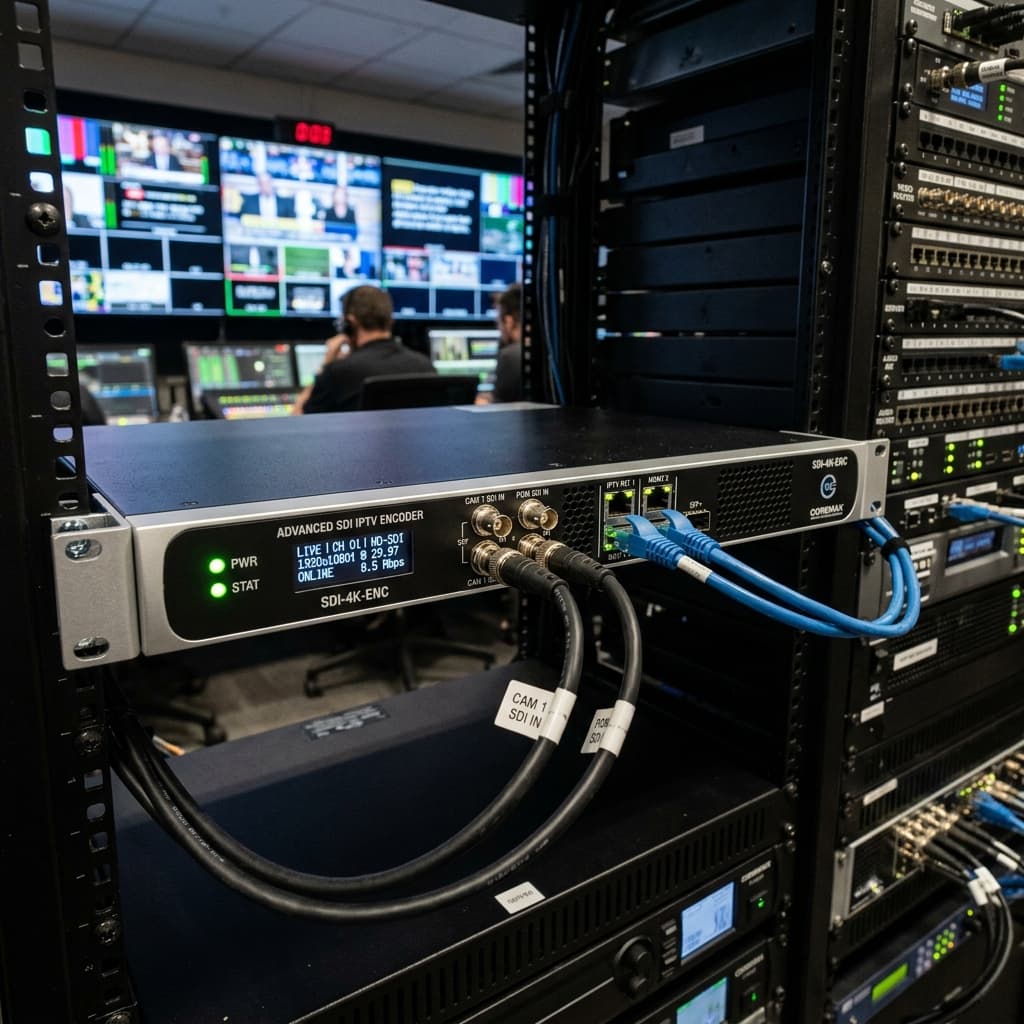
To understand how broadcast grade video conversion works, it is important to analyze the internal hardware architecture of an sdi to iptv encoder. Unlike consumer grade HDMI capture cards, professional Serial Digital Interface signals carry uncompressed digital video over coaxial lines with strict timing, impedance, and voltage requirements.
In contrast to computer software capture setups, an enterprise sdi to iptv encoder features dedicated hardware equalizers, reclocking circuits, and field programmable gate arrays engineered specifically for broadcast signal integrity. When an uncompressed SDI video stream enters the BNC input port, the sdi to iptv encoder locks onto the video clock frequency and separates embedded audio channels. The raw video frame data is immediately routed into specialized system on chip hardware encoding modules. The media feed is compressed using High Efficiency Video Coding H265 or High Definition H264 compression standards, while embedded multi channel audio is encoded into Advanced Audio Coding AAC streams. Because hardware compression occurs directly on dedicated silicon, processing delay is kept to a microscopic sub second duration. The resulting media packets are packaged into standard IP network transport protocols such as SRT, UDP multicast, RTSP, or RTMP, enabling seamless transmission across enterprise network switches and cloud distribution nodes.
## Essential Evaluation Criteria for Selecting SDI to IPTV Encoder Systems
Selecting the ideal sdi to iptv encoder appliance requires reviewing primary engineering specifications designed for mission critical broadcast applications. Here are the primary benchmarks that define an enterprise class sdi to iptv encoder.
1. Robust BNC Signal Ingestion and Clock Reclocking. Broadcast grade input equalization and clock reclocking allow an sdi to iptv encoder to lock onto long coaxial cable runs without signal degradation or video sync loss.
2. Multi Rate SDI Interface Compatibility. Supporting HD SDI, 3G SDI, and 12G SDI standards enables an sdi to iptv encoder to process video resolutions up to four K Ultra HD at sixty frames per second.
3. Advanced H265 HEVC Hardware Compression. Utilizing modern H265 video compression algorithms enables an sdi to iptv encoder to deliver pristine picture quality while reducing network bandwidth consumption by up to fifty percent compared to older H264 encoders.
4. Embedded Audio Extraction and Multi Stream Output. The ability to extract multiple embedded audio channels and encode independent primary and secondary video streams allows an sdi to iptv encoder to feed different network destinations simultaneously.
5. Enterprise Reliability and Dual Power Inputs. Rugged metal chassis construction and redundant power inputs ensure an sdi to iptv encoder operates continuously without thermal failure or unexpected broadcast disruption.
## Stream Transport Protocols and Network Optimization in SDI to IPTV Encoder Deployments
Selecting appropriate network transport protocols is essential for maintaining stream stability when transmitting SDI source feeds over local area networks or public internet backbones. Traditional uncompressed SDI video streams require massive gigabit bandwidth, making direct transmission over wide area networks impossible without compression.
Modern sdi to iptv encoder devices overcome these bandwidth limitations by utilizing advanced IP encapsulation protocols. When transmitting live signals inside local broadcast facilities or stadium environments, configuring an sdi to iptv encoder to output UDP multicast or RTSP streams allows multiple production monitors and display screens to view the live video feed simultaneously without placing extra strain on network switches. When transmitting live feeds across public internet connections to remote cloud ingestion servers, setting the sdi to iptv encoder to Secure Reliable Transport SRT mode ensures built in packet loss recovery, ARQ error correction, and stream encryption. This guarantees high definition SDI camera feeds reach target streaming servers smoothly even across lossy or jittery internet connections.
## Integrating SDI to IPTV Encoder Technology with Eagle4k Infrastructure
While a professional sdi to iptv encoder solves local video signal encoding challenges, distributing these live broadcast feeds to global subscriber displays requires a high capacity cloud streaming infrastructure. Inadequate server capacity can cause buffering bottlenecks and video delay for end users.
Pairing an sdi to iptv encoder with the Eagle4k cloud distribution platform creates a high performance broadcast pipeline. Eagle4k operates global edge server clusters equipped with Anti Freeze version nine acceleration software. When the output stream from an sdi to iptv encoder reaches Eagle4k cloud ingestion points, Intelligent Traffic Routing dynamically routes the live media packets across low latency fiber backbones directly to user display screens. This integrated architecture guarantees ninety nine point ninety nine percent server uptime, instant channel changing response, and buffer free four K streaming performance for viewers across Smart TVs, Firesticks, and mobile devices.
## Step by Step Workflow for Configuring SDI to IPTV Encoder Appliances
Configuring an sdi to iptv encoder for live video broadcasting across your IP network is a straightforward procedure. Follow these logical steps to start streaming your SDI camera or switcher feed.
1. Connect your SDI video source cable securely into the BNC input port of your sdi to iptv encoder, twisting the locking connector to ensure a tight fit.
2. Connect a high speed Ethernet cable from the network streaming port of the encoder to your local network switch.
3. Power on the encoder unit and locate the assigned IP address on the hardware status display screen or via your network router management tool.
4. Open a web browser on a computer connected to the same network and type the encoder IP address into the location bar.
5. Log into the web management interface and navigate to the video input and encoding settings panel.
6. Select H265 HEVC as the primary video encoding format and set your target resolution to four K or high definition at sixty frames per second.
7. Configure the stream output protocol to SRT or RTSP, entering the destination server URL and port details provided by your Eagle4k distribution panel.
8. Save your configuration parameters and click start to initiate live encoding and broadcast your SDI video feed.
## Frequently Asked Questions About SDI to IPTV Encoder Hardware
Question one. What is an sdi to iptv encoder and how does it function.
Answer. An sdi to iptv encoder is a dedicated hardware appliance that ingests professional BNC SDI video feeds, compresses the audio and video signals using H265 or H264 hardware codecs, and outputs digital IP streaming packets across networks.
Question two. What is the difference between SDI inputs and HDMI inputs on an IPTV encoder.
Answer. SDI connections use locking BNC connectors and coaxial cables designed for long distance professional broadcast equipment, whereas HDMI connections use friction fit cables primarily designed for consumer electronics over short distances.
Question three. Can an sdi to iptv encoder process embedded SDI audio channels.
Answer. Yes, a professional sdi to iptv encoder automatically extracts digital audio channels from the SDI video feed and compresses them into high quality AAC audio streams synchronized with the video.
Question four. Which video compression codecs are recommended for an sdi to iptv encoder.
Answer. High Efficiency Video Coding H265 HEVC is strongly recommended for an sdi to iptv encoder because it maintains crisp four K picture quality while using up to fifty percent less network bandwidth than legacy H264 codecs.
Question five. Why is pairing an sdi to iptv encoder with Eagle4k recommended for live streaming.
Answer. Eagle4k provides global cloud edge distribution, Anti Freeze version nine software technology, and high bandwidth network routing, ensuring streams generated by an sdi to iptv encoder reach thousands of subscribers with maximum stability and pristine four K visual quality.
## Summary and System Recommendations
In summary, selecting a high performance sdi to iptv encoder is the single most critical hardware decision for broadcast engineers seeking to bridge traditional SDI production equipment with modern IP streaming networks. By leveraging broadcast grade BNC signal processing, advanced H265 compression, and versatile streaming protocol support, standalone SDI hardware encoders deliver unmatched reliability and low delay performance. Connecting your sdi to iptv encoder to the global cloud distribution network at Eagle4k ensures ultimate broadcast stability, ninety nine point ninety nine percent uptime, and pristine four K viewing quality across all user displays.
The professional television broadcasting industry relies heavily on Serial Digital Interface connections to transmit uncompressed high definition video signals across production studios and mobile broadcast trucks. As media distribution shifts toward cloud platforms and broadband internet protocol networks, bridging traditional SDI infrastructure with digital IP streaming networks has become an absolute necessity for broadcast engineers. Deploying a dedicated sdi to iptv encoder provides the critical hardware conversion link that ingests uncompressed SDI video feeds and converts them into optimized digital data streams for local networks and worldwide media backbones. Evaluating sdi to iptv encoder systems requires examining key engineering standards including BNC connector physical locking, clock synchronization, spatial video resolution support, H265 HEVC compression efficiency, embedded audio extraction, and continuous stream stability. High performance SDI video conversion appliances must process high bitrate video sources without frame drops, signal jitter, or color space loss during long live event broadcasts. In this detailed technical analysis, we examine how sdi to iptv encoder hardware converts raw broadcast feeds, review vital infrastructure benchmarks, detail step by step setup workflows, answer common operator questions, and explain why pairing professional SDI hardware encoders with the Eagle4k cloud network guarantees ultimate uptime and pristine four K visual quality.
## Understanding the Hardware Architecture of an SDI to IPTV Encoder
To understand how broadcast grade video conversion works, it is important to analyze the internal hardware architecture of an sdi to iptv encoder. Unlike consumer grade HDMI capture cards, professional Serial Digital Interface signals carry uncompressed digital video over coaxial lines with strict timing, impedance, and voltage requirements.
In contrast to computer software capture setups, an enterprise sdi to iptv encoder features dedicated hardware equalizers, reclocking circuits, and field programmable gate arrays engineered specifically for broadcast signal integrity. When an uncompressed SDI video stream enters the BNC input port, the sdi to iptv encoder locks onto the video clock frequency and separates embedded audio channels. The raw video frame data is immediately routed into specialized system on chip hardware encoding modules. The media feed is compressed using High Efficiency Video Coding H265 or High Definition H264 compression standards, while embedded multi channel audio is encoded into Advanced Audio Coding AAC streams. Because hardware compression occurs directly on dedicated silicon, processing delay is kept to a microscopic sub second duration. The resulting media packets are packaged into standard IP network transport protocols such as SRT, UDP multicast, RTSP, or RTMP, enabling seamless transmission across enterprise network switches and cloud distribution nodes.
## Essential Evaluation Criteria for Selecting SDI to IPTV Encoder Systems
Selecting the ideal sdi to iptv encoder appliance requires reviewing primary engineering specifications designed for mission critical broadcast applications. Here are the primary benchmarks that define an enterprise class sdi to iptv encoder.
1. Robust BNC Signal Ingestion and Clock Reclocking. Broadcast grade input equalization and clock reclocking allow an sdi to iptv encoder to lock onto long coaxial cable runs without signal degradation or video sync loss.
2. Multi Rate SDI Interface Compatibility. Supporting HD SDI, 3G SDI, and 12G SDI standards enables an sdi to iptv encoder to process video resolutions up to four K Ultra HD at sixty frames per second.
3. Advanced H265 HEVC Hardware Compression. Utilizing modern H265 video compression algorithms enables an sdi to iptv encoder to deliver pristine picture quality while reducing network bandwidth consumption by up to fifty percent compared to older H264 encoders.
4. Embedded Audio Extraction and Multi Stream Output. The ability to extract multiple embedded audio channels and encode independent primary and secondary video streams allows an sdi to iptv encoder to feed different network destinations simultaneously.
5. Enterprise Reliability and Dual Power Inputs. Rugged metal chassis construction and redundant power inputs ensure an sdi to iptv encoder operates continuously without thermal failure or unexpected broadcast disruption.
## Stream Transport Protocols and Network Optimization in SDI to IPTV Encoder Deployments
Selecting appropriate network transport protocols is essential for maintaining stream stability when transmitting SDI source feeds over local area networks or public internet backbones. Traditional uncompressed SDI video streams require massive gigabit bandwidth, making direct transmission over wide area networks impossible without compression.
Modern sdi to iptv encoder devices overcome these bandwidth limitations by utilizing advanced IP encapsulation protocols. When transmitting live signals inside local broadcast facilities or stadium environments, configuring an sdi to iptv encoder to output UDP multicast or RTSP streams allows multiple production monitors and display screens to view the live video feed simultaneously without placing extra strain on network switches. When transmitting live feeds across public internet connections to remote cloud ingestion servers, setting the sdi to iptv encoder to Secure Reliable Transport SRT mode ensures built in packet loss recovery, ARQ error correction, and stream encryption. This guarantees high definition SDI camera feeds reach target streaming servers smoothly even across lossy or jittery internet connections.
## Integrating SDI to IPTV Encoder Technology with Eagle4k Infrastructure
While a professional sdi to iptv encoder solves local video signal encoding challenges, distributing these live broadcast feeds to global subscriber displays requires a high capacity cloud streaming infrastructure. Inadequate server capacity can cause buffering bottlenecks and video delay for end users.
Pairing an sdi to iptv encoder with the Eagle4k cloud distribution platform creates a high performance broadcast pipeline. Eagle4k operates global edge server clusters equipped with Anti Freeze version nine acceleration software. When the output stream from an sdi to iptv encoder reaches Eagle4k cloud ingestion points, Intelligent Traffic Routing dynamically routes the live media packets across low latency fiber backbones directly to user display screens. This integrated architecture guarantees ninety nine point ninety nine percent server uptime, instant channel changing response, and buffer free four K streaming performance for viewers across Smart TVs, Firesticks, and mobile devices.
## Step by Step Workflow for Configuring SDI to IPTV Encoder Appliances
Configuring an sdi to iptv encoder for live video broadcasting across your IP network is a straightforward procedure. Follow these logical steps to start streaming your SDI camera or switcher feed.
1. Connect your SDI video source cable securely into the BNC input port of your sdi to iptv encoder, twisting the locking connector to ensure a tight fit.
2. Connect a high speed Ethernet cable from the network streaming port of the encoder to your local network switch.
3. Power on the encoder unit and locate the assigned IP address on the hardware status display screen or via your network router management tool.
4. Open a web browser on a computer connected to the same network and type the encoder IP address into the location bar.
5. Log into the web management interface and navigate to the video input and encoding settings panel.
6. Select H265 HEVC as the primary video encoding format and set your target resolution to four K or high definition at sixty frames per second.
7. Configure the stream output protocol to SRT or RTSP, entering the destination server URL and port details provided by your Eagle4k distribution panel.
8. Save your configuration parameters and click start to initiate live encoding and broadcast your SDI video feed.
## Frequently Asked Questions About SDI to IPTV Encoder Hardware
Question one. What is an sdi to iptv encoder and how does it function.
Answer. An sdi to iptv encoder is a dedicated hardware appliance that ingests professional BNC SDI video feeds, compresses the audio and video signals using H265 or H264 hardware codecs, and outputs digital IP streaming packets across networks.
Question two. What is the difference between SDI inputs and HDMI inputs on an IPTV encoder.
Answer. SDI connections use locking BNC connectors and coaxial cables designed for long distance professional broadcast equipment, whereas HDMI connections use friction fit cables primarily designed for consumer electronics over short distances.
Question three. Can an sdi to iptv encoder process embedded SDI audio channels.
Answer. Yes, a professional sdi to iptv encoder automatically extracts digital audio channels from the SDI video feed and compresses them into high quality AAC audio streams synchronized with the video.
Question four. Which video compression codecs are recommended for an sdi to iptv encoder.
Answer. High Efficiency Video Coding H265 HEVC is strongly recommended for an sdi to iptv encoder because it maintains crisp four K picture quality while using up to fifty percent less network bandwidth than legacy H264 codecs.
Question five. Why is pairing an sdi to iptv encoder with Eagle4k recommended for live streaming.
Answer. Eagle4k provides global cloud edge distribution, Anti Freeze version nine software technology, and high bandwidth network routing, ensuring streams generated by an sdi to iptv encoder reach thousands of subscribers with maximum stability and pristine four K visual quality.
## Summary and System Recommendations
In summary, selecting a high performance sdi to iptv encoder is the single most critical hardware decision for broadcast engineers seeking to bridge traditional SDI production equipment with modern IP streaming networks. By leveraging broadcast grade BNC signal processing, advanced H265 compression, and versatile streaming protocol support, standalone SDI hardware encoders deliver unmatched reliability and low delay performance. Connecting your sdi to iptv encoder to the global cloud distribution network at Eagle4k ensures ultimate broadcast stability, ninety nine point ninety nine percent uptime, and pristine four K viewing quality across all user displays.