
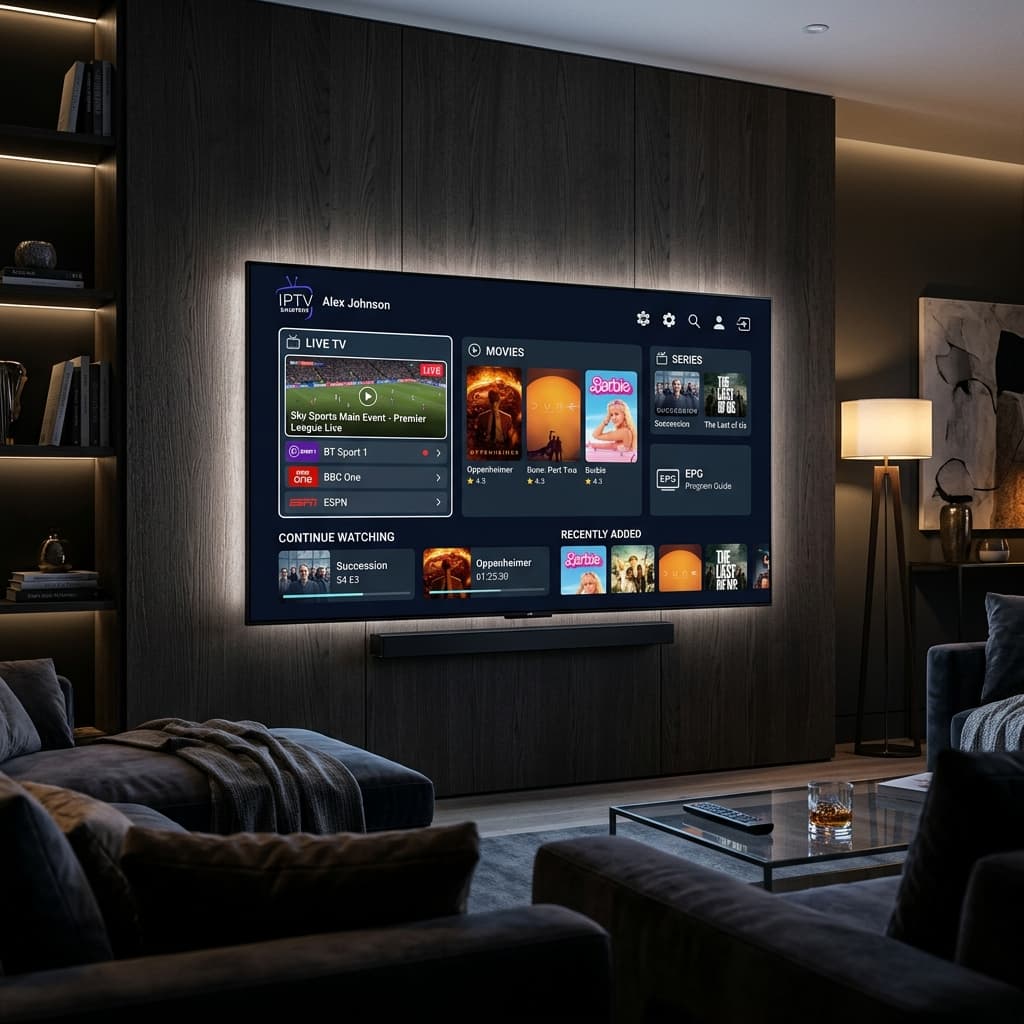
# IPTV Smarters Player Setup Guide 2026 Features and Best Practices
In the modern digital entertainment ecosystem, IPTV Smarters Player has earned its reputation as one of the most versatile and user friendly application platforms for streaming live television channels, sports broadcasts, and on demand video catalogs. Whether you are using a Smart TV, an Amazon Firestick, an Android TV box, an Apple iOS device, or a personal computer, IPTV Smarters Player offers a clean and intuitive media portal.
In this comprehensive guide, we explain everything you need to know about setting up IPTV Smarters Player in 2026, exploring its primary technical capabilities, providing step by step login instructions, answering common questions, and demonstrating why pairing IPTV Smarters Player with Eagle4k servers yields an unmatched viewing experience.
## What Is IPTV Smarters Player and How Does It Work
IPTV Smarters Player is a specialized media player software application designed to decode and stream digital television protocol feeds. It does not provide TV channels or content playlists by itself. Instead, it serves as a powerful front end player interface where users input their subscription credentials provided by an IPTV service provider.
By connecting to secure streaming servers via Xtream Codes API or M3U playlist URLs, IPTV Smarters Player organizes thousands of live television channels, Electronic Program Guide program data, and video on demand categories into an elegant user dashboard.
## Key Features of IPTV Smarters Player
1. Multi Screen Viewing. IPTV Smarters Player allows users to split their screen and watch multiple live sports broadcasts simultaneously on compatible devices.
2. Master Search Functionality. Easily search across live television channels, movies, and series using quick keyword filtering.
3. Catch Up and Electronic Program Guide Integration. Check upcoming broadcast schedules and catch up on missed television shows directly from the EPG grid interface.
4. Parental Control Settings. Restrict access to specific channel categories and adult content with secure PIN protection.
5. External Player Integration. Seamlessly launch external video players like VLC Player for advanced audio track decoding.
## Step by Step Guide How to Install and Log In to IPTV Smarters Player
Setting up IPTV Smarters Player with your Eagle4k subscription takes less than five minutes.
1. Download IPTV Smarters Player from the official app store on your Smart TV, Firestick, Android device, or Apple iOS device.
2. Open the application on your screen and select the option to Load Your Playlist or Log In with Xtream Codes API.
3. Enter any profile name of your choice in the first box.
4. Type your unique username, password, and server URL received in your activation email from Eagle4k.
5. Click Add User to initiate automatic downloading of channel categories and movie libraries.
6. Select Live TV, Movies, or Series to start streaming immediately in pristine four K quality.
## Frequently Asked Questions and Answers About IPTV Smarters Player
Question one. Is IPTV Smarters Player free to download and use.
Answer. Yes, the core IPTV Smarters Player application is free to download across official app stores, although premium feature upgrades are available for advanced customization.
Question two. Why are channels failing to load in IPTV Smarters Player.
Answer. Channel loading failures usually occur due to an incorrect server URL address, expired subscription credentials, or network firewall restrictions. Verifying your Xtream Codes API details solves this issue.
Question three. Can I use IPTV Smarters Player on Samsung and LG Smart TVs.
Answer. Yes, IPTV Smarters Player is available directly in the official Samsung App Store for Tizen OS and LG Content Store for webOS televisions.
Question four. Why is Eagle4k the best service provider for IPTV Smarters Player.
Answer. Eagle4k utilizes Anti Freeze version nine point zero technology across six dedicated global edge server clusters, ensuring ninety nine point ninety nine percent uptime without buffering or frozen frames.
Question five. What internet speed is required for streaming four K content on IPTV Smarters Player.
Answer. A minimum stable download speed of twenty five megabits per second is recommended for High Definition streams, while fifty megabits per second or higher is recommended for smooth four K live sports.
## Conclusion
If you want an intuitive, feature rich, and dependable television application, IPTV Smarters Player combined with an Eagle4k subscription is the gold standard for home theater streaming in 2026. Install it today and elevate your viewing experience.
In the modern digital entertainment ecosystem, IPTV Smarters Player has earned its reputation as one of the most versatile and user friendly application platforms for streaming live television channels, sports broadcasts, and on demand video catalogs. Whether you are using a Smart TV, an Amazon Firestick, an Android TV box, an Apple iOS device, or a personal computer, IPTV Smarters Player offers a clean and intuitive media portal.
In this comprehensive guide, we explain everything you need to know about setting up IPTV Smarters Player in 2026, exploring its primary technical capabilities, providing step by step login instructions, answering common questions, and demonstrating why pairing IPTV Smarters Player with Eagle4k servers yields an unmatched viewing experience.
## What Is IPTV Smarters Player and How Does It Work
IPTV Smarters Player is a specialized media player software application designed to decode and stream digital television protocol feeds. It does not provide TV channels or content playlists by itself. Instead, it serves as a powerful front end player interface where users input their subscription credentials provided by an IPTV service provider.
By connecting to secure streaming servers via Xtream Codes API or M3U playlist URLs, IPTV Smarters Player organizes thousands of live television channels, Electronic Program Guide program data, and video on demand categories into an elegant user dashboard.
## Key Features of IPTV Smarters Player
1. Multi Screen Viewing. IPTV Smarters Player allows users to split their screen and watch multiple live sports broadcasts simultaneously on compatible devices.
2. Master Search Functionality. Easily search across live television channels, movies, and series using quick keyword filtering.
3. Catch Up and Electronic Program Guide Integration. Check upcoming broadcast schedules and catch up on missed television shows directly from the EPG grid interface.
4. Parental Control Settings. Restrict access to specific channel categories and adult content with secure PIN protection.
5. External Player Integration. Seamlessly launch external video players like VLC Player for advanced audio track decoding.
## Step by Step Guide How to Install and Log In to IPTV Smarters Player
Setting up IPTV Smarters Player with your Eagle4k subscription takes less than five minutes.
1. Download IPTV Smarters Player from the official app store on your Smart TV, Firestick, Android device, or Apple iOS device.
2. Open the application on your screen and select the option to Load Your Playlist or Log In with Xtream Codes API.
3. Enter any profile name of your choice in the first box.
4. Type your unique username, password, and server URL received in your activation email from Eagle4k.
5. Click Add User to initiate automatic downloading of channel categories and movie libraries.
6. Select Live TV, Movies, or Series to start streaming immediately in pristine four K quality.
## Frequently Asked Questions and Answers About IPTV Smarters Player
Question one. Is IPTV Smarters Player free to download and use.
Answer. Yes, the core IPTV Smarters Player application is free to download across official app stores, although premium feature upgrades are available for advanced customization.
Question two. Why are channels failing to load in IPTV Smarters Player.
Answer. Channel loading failures usually occur due to an incorrect server URL address, expired subscription credentials, or network firewall restrictions. Verifying your Xtream Codes API details solves this issue.
Question three. Can I use IPTV Smarters Player on Samsung and LG Smart TVs.
Answer. Yes, IPTV Smarters Player is available directly in the official Samsung App Store for Tizen OS and LG Content Store for webOS televisions.
Question four. Why is Eagle4k the best service provider for IPTV Smarters Player.
Answer. Eagle4k utilizes Anti Freeze version nine point zero technology across six dedicated global edge server clusters, ensuring ninety nine point ninety nine percent uptime without buffering or frozen frames.
Question five. What internet speed is required for streaming four K content on IPTV Smarters Player.
Answer. A minimum stable download speed of twenty five megabits per second is recommended for High Definition streams, while fifty megabits per second or higher is recommended for smooth four K live sports.
## Conclusion
If you want an intuitive, feature rich, and dependable television application, IPTV Smarters Player combined with an Eagle4k subscription is the gold standard for home theater streaming in 2026. Install it today and elevate your viewing experience.