
# Technical Overview of Hardware IPTV Encoder Appliances for Commercial Video Streaming Networks
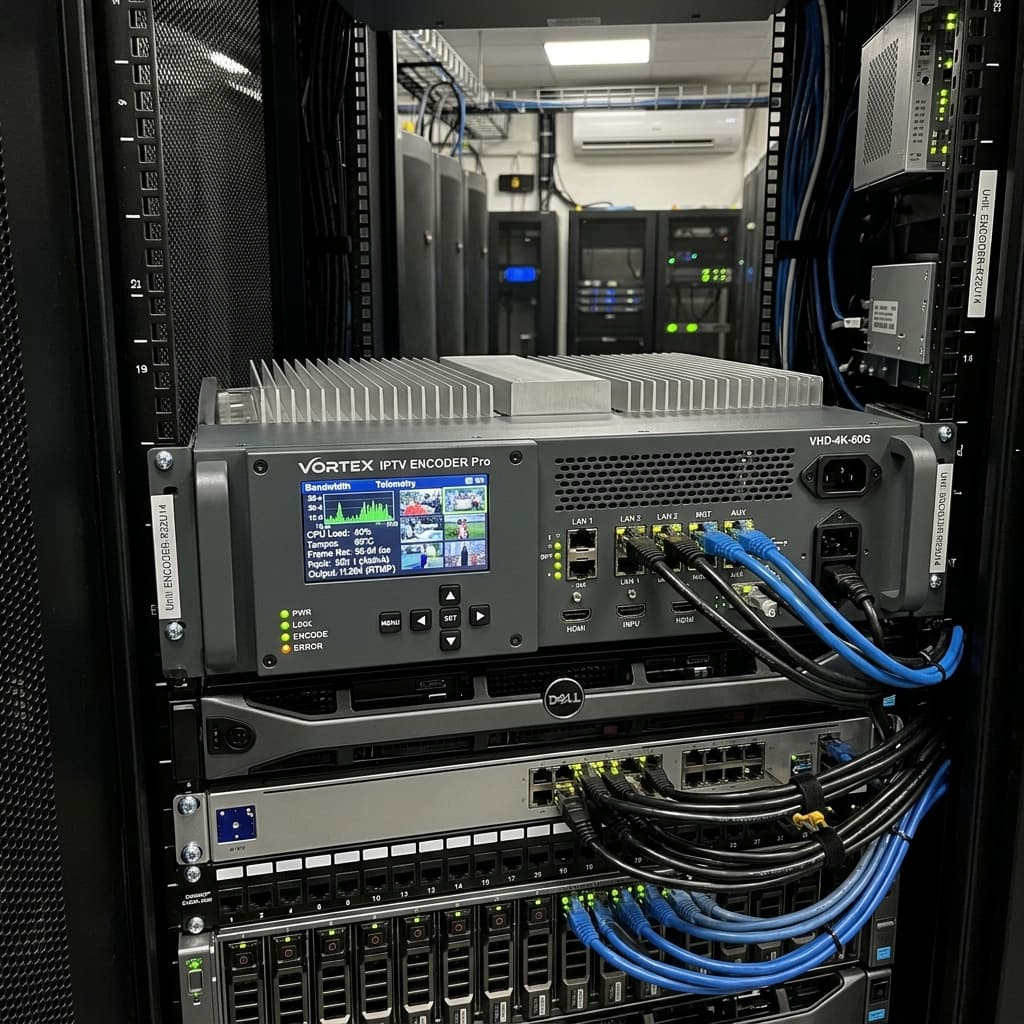
In enterprise broadcasting, corporate media facilities, hospitality television distribution, and sports arena infrastructure, maintaining uninterrupted continuous video encoding requires dedicated electronic hardware built specifically for real time signal processing. A dedicated hardware iptv encoder is a specialized physical appliance designed to capture uncompressed audio and video signals directly from HDMI, SDI, or composite video sources, compress the data using dedicated silicon signal processing chips, and output IP network packets across local switches or internet connections. Unlike general purpose computer servers running software encoders that are vulnerable to operating system crashes and background task interference, a standalone hardware iptv encoder offers instant boot times, industrial thermal stability, low latency encoding, and twenty four seven operational reliability. In this detailed educational resource, we explore how hardware iptv encoder devices function, examine core architectural parameters, detail step by step setup workflows, answer common system engineering questions, and explain how pairing hardware encoders with cloud distribution networks like Eagle4k guarantees ultimate streaming performance.
## Understanding the Core Architecture Behind Hardware IPTV Encoder Systems
To evaluate why professional broadcast engineers choose dedicated physical appliances over software encoding, it is essential to analyze the internal hardware architecture of a hardware iptv encoder. Traditional software encoders rely on host computer CPUs and operating systems to execute video compression. When host computer systems experience background software updates, driver conflicts, or memory bottlenecks, software encoders drop frames or crash entirely during live broadcasts.
A dedicated hardware iptv encoder resolves these vulnerabilities by utilizing application specific integrated circuits, field programmable gate arrays, and dedicated digital signal processors designed exclusively for video processing. Physical video inputs such as 12G SDI or HDMI two point zero feed raw uncompressed video frames directly into hardware processing pipelines. Hardware DSP chips compress incoming media using advanced algorithms like H264 AVC or H265 HEVC in real time with zero frame dropping. Once compressed, onboard networking chips encapsulate media frames into standardized streaming transport protocols including UDP multicast, RTP, RTSP, RTMP, HLS, or SRT. The encoder outputs high bitrate IP packets through dedicated Gigabit ethernet interfaces onto facility switches. Any compatible Smart TV application, set top box decoder, or cloud server can ingest and decode the stream seamlessly.
## Essential Features and Technical Parameters of a Hardware IPTV Encoder
Selecting the optimal hardware iptv encoder requires evaluating several vital hardware parameters and engineering features. Here are the core specifications associated with enterprise grade units.
1. Industrial Physical Reliability and Uptime. A professional hardware iptv encoder features fanless or heat pipe cooling aluminum chassis, fan failure alerts, dual redundant power inputs, and passive cooling fins, ensuring continuous twenty four seven operation in server racks.
2. Hardware H265 HEVC Compression Engine. Modern hardware iptv encoder models incorporate H265 HEVC silicon encoding blocks that reduce required streaming bandwidth by up to fifty percent while maintaining pristine four K resolution at sixty frames per second.
3. Multi Protocol Simultaneous Streaming Distribution. A versatile hardware iptv encoder can push live video streams over multiple IP transport protocols concurrently, broadcasting UDP multicast to local facility screens while pushing RTMP or SRT feeds to remote cloud distribution servers.
4. Active Physical Input Loop Output. Hardware appliances feature physical HDMI or SDI loop through output ports, allowing engineers to connect local engineering reference monitors directly without needing external signal splitters.
5. Ultralow Encoding Latency. Specialized hardware silicon processing enables a hardware iptv encoder to achieve glass to glass encoding latency under one hundred fifty milliseconds, crucial for live sports coverage and interactive video monitoring.
## Analyzing Network Performance and Anti Freeze Reliability
System stability and packet throughput represent the definitive benchmarks when integrating a hardware iptv encoder into commercial broadcasting, corporate media networks, or enterprise IPTV distribution. Video freezing, frame stuttering, and audio desynchronization severely damage viewer satisfaction during high profile live broadcasts.
When transmitting high bitrate four K media across local area networks or public internet links, managing network jitter and bandwidth allocation is essential. Enterprise hardware encoders combine constant bitrate algorithms with Anti Freeze version nine software engineering to balance traffic throughput automatically. This intelligent data management prevents stream freezes and video corruption when hundreds of receiving decoders request the stream simultaneously. When connecting your hardware encoder output to high availability cloud infrastructure like Eagle4k, operating six global edge server clusters guarantees ninety nine point ninety nine percent server uptime and silky smooth four K video playback.
## Step by Step Setup Instructions for a Hardware IPTV Encoder
Configuring a new hardware iptv encoder inside your equipment rack is a straightforward technical process that takes under five minutes. Follow these logical steps to initialize your broadcast network stream.
1. Securely mount your hardware iptv encoder into an equipment rack shelf or place it on a well ventilated surface near your video source equipment.
2. Connect a high quality HDMI or SDI video cable from your video source equipment to the physical input port on the encoder appliance.
3. Optional step. Connect an HDMI or SDI loop output cable from the encoder chassis directly to a local reference display monitor.
4. Connect a CAT6 ethernet cable from the encoder RJ45 Gigabit network port to your managed network switch or router.
5. Connect the power adapter to an electrical outlet to initialize the encoder hardware firmware.
6. Open a web browser on a workstation connected to the same network subnet and enter the default IP address of the encoder to open the administration interface.
7. Navigate to network settings to assign static IP addresses, subnet masks, and network gateway parameters.
8. Navigate to encoding options to select your desired resolution, frame rate, target bitrate, H265 HEVC compression format, and transport protocols like RTSP or UDP multicast, then save settings to begin broadcasting.
## Frequently Asked Questions About Hardware IPTV Encoder Appliances
Question one. What is the difference between a software encoder and a hardware iptv encoder.
Answer. A software encoder runs as an application on a general purpose computer CPU, whereas a hardware iptv encoder is a dedicated standalone physical appliance powered by specialized video processing DSP chips for maximum stability.
Question two. Why are hardware iptv encoder devices preferred for twenty four seven commercial streaming.
Answer. Hardware iptv encoder devices feature industrial components, dedicated thermal dissipation, instant boot firmware, and zero operating system crash risks, making them ideal for continuous non stop broadcasting.
Question three. Can a hardware iptv encoder stream live video over the internet.
Answer. Yes, modern hardware iptv encoder devices support internet streaming protocols such as SRT and RTMP, allowing you to stream video directly to remote cloud servers, social platforms, or private media distribution networks.
Question four. What compression format is recommended for a hardware iptv encoder.
Answer. H265 HEVC hardware compression is strongly recommended because it delivers crisp four K video quality while using up to fifty percent less bandwidth compared to older H264 compression standards.
Question five. Can a hardware iptv encoder work alongside Eagle4k streaming servers.
Answer. Yes, a hardware iptv encoder can ingest video from local production equipment and stream it into network infrastructure compatible with commercial IPTV platforms and Eagle4k edge servers.
## Summary and Final System Recommendations
In summary, installing a professional hardware iptv encoder is the most reliable decision for facility managers, broadcast engineers, and media network administrators seeking robust video distribution. By converting physical HDMI and SDI signals into bandwidth efficient IP network streams using dedicated silicon processing, a hardware iptv encoder provides unlimited transmission distance, industrial operational reliability, and ultralow latency performance. Pairing your hardware encoder infrastructure with high availability cloud networks like Eagle4k ensures pristine four K video delivery across all connected subscriber screens. Configure your network encoder today and empower your digital media infrastructure.
In enterprise broadcasting, corporate media facilities, hospitality television distribution, and sports arena infrastructure, maintaining uninterrupted continuous video encoding requires dedicated electronic hardware built specifically for real time signal processing. A dedicated hardware iptv encoder is a specialized physical appliance designed to capture uncompressed audio and video signals directly from HDMI, SDI, or composite video sources, compress the data using dedicated silicon signal processing chips, and output IP network packets across local switches or internet connections. Unlike general purpose computer servers running software encoders that are vulnerable to operating system crashes and background task interference, a standalone hardware iptv encoder offers instant boot times, industrial thermal stability, low latency encoding, and twenty four seven operational reliability. In this detailed educational resource, we explore how hardware iptv encoder devices function, examine core architectural parameters, detail step by step setup workflows, answer common system engineering questions, and explain how pairing hardware encoders with cloud distribution networks like Eagle4k guarantees ultimate streaming performance.
## Understanding the Core Architecture Behind Hardware IPTV Encoder Systems
To evaluate why professional broadcast engineers choose dedicated physical appliances over software encoding, it is essential to analyze the internal hardware architecture of a hardware iptv encoder. Traditional software encoders rely on host computer CPUs and operating systems to execute video compression. When host computer systems experience background software updates, driver conflicts, or memory bottlenecks, software encoders drop frames or crash entirely during live broadcasts.
A dedicated hardware iptv encoder resolves these vulnerabilities by utilizing application specific integrated circuits, field programmable gate arrays, and dedicated digital signal processors designed exclusively for video processing. Physical video inputs such as 12G SDI or HDMI two point zero feed raw uncompressed video frames directly into hardware processing pipelines. Hardware DSP chips compress incoming media using advanced algorithms like H264 AVC or H265 HEVC in real time with zero frame dropping. Once compressed, onboard networking chips encapsulate media frames into standardized streaming transport protocols including UDP multicast, RTP, RTSP, RTMP, HLS, or SRT. The encoder outputs high bitrate IP packets through dedicated Gigabit ethernet interfaces onto facility switches. Any compatible Smart TV application, set top box decoder, or cloud server can ingest and decode the stream seamlessly.
## Essential Features and Technical Parameters of a Hardware IPTV Encoder
Selecting the optimal hardware iptv encoder requires evaluating several vital hardware parameters and engineering features. Here are the core specifications associated with enterprise grade units.
1. Industrial Physical Reliability and Uptime. A professional hardware iptv encoder features fanless or heat pipe cooling aluminum chassis, fan failure alerts, dual redundant power inputs, and passive cooling fins, ensuring continuous twenty four seven operation in server racks.
2. Hardware H265 HEVC Compression Engine. Modern hardware iptv encoder models incorporate H265 HEVC silicon encoding blocks that reduce required streaming bandwidth by up to fifty percent while maintaining pristine four K resolution at sixty frames per second.
3. Multi Protocol Simultaneous Streaming Distribution. A versatile hardware iptv encoder can push live video streams over multiple IP transport protocols concurrently, broadcasting UDP multicast to local facility screens while pushing RTMP or SRT feeds to remote cloud distribution servers.
4. Active Physical Input Loop Output. Hardware appliances feature physical HDMI or SDI loop through output ports, allowing engineers to connect local engineering reference monitors directly without needing external signal splitters.
5. Ultralow Encoding Latency. Specialized hardware silicon processing enables a hardware iptv encoder to achieve glass to glass encoding latency under one hundred fifty milliseconds, crucial for live sports coverage and interactive video monitoring.
## Analyzing Network Performance and Anti Freeze Reliability
System stability and packet throughput represent the definitive benchmarks when integrating a hardware iptv encoder into commercial broadcasting, corporate media networks, or enterprise IPTV distribution. Video freezing, frame stuttering, and audio desynchronization severely damage viewer satisfaction during high profile live broadcasts.
When transmitting high bitrate four K media across local area networks or public internet links, managing network jitter and bandwidth allocation is essential. Enterprise hardware encoders combine constant bitrate algorithms with Anti Freeze version nine software engineering to balance traffic throughput automatically. This intelligent data management prevents stream freezes and video corruption when hundreds of receiving decoders request the stream simultaneously. When connecting your hardware encoder output to high availability cloud infrastructure like Eagle4k, operating six global edge server clusters guarantees ninety nine point ninety nine percent server uptime and silky smooth four K video playback.
## Step by Step Setup Instructions for a Hardware IPTV Encoder
Configuring a new hardware iptv encoder inside your equipment rack is a straightforward technical process that takes under five minutes. Follow these logical steps to initialize your broadcast network stream.
1. Securely mount your hardware iptv encoder into an equipment rack shelf or place it on a well ventilated surface near your video source equipment.
2. Connect a high quality HDMI or SDI video cable from your video source equipment to the physical input port on the encoder appliance.
3. Optional step. Connect an HDMI or SDI loop output cable from the encoder chassis directly to a local reference display monitor.
4. Connect a CAT6 ethernet cable from the encoder RJ45 Gigabit network port to your managed network switch or router.
5. Connect the power adapter to an electrical outlet to initialize the encoder hardware firmware.
6. Open a web browser on a workstation connected to the same network subnet and enter the default IP address of the encoder to open the administration interface.
7. Navigate to network settings to assign static IP addresses, subnet masks, and network gateway parameters.
8. Navigate to encoding options to select your desired resolution, frame rate, target bitrate, H265 HEVC compression format, and transport protocols like RTSP or UDP multicast, then save settings to begin broadcasting.
## Frequently Asked Questions About Hardware IPTV Encoder Appliances
Question one. What is the difference between a software encoder and a hardware iptv encoder.
Answer. A software encoder runs as an application on a general purpose computer CPU, whereas a hardware iptv encoder is a dedicated standalone physical appliance powered by specialized video processing DSP chips for maximum stability.
Question two. Why are hardware iptv encoder devices preferred for twenty four seven commercial streaming.
Answer. Hardware iptv encoder devices feature industrial components, dedicated thermal dissipation, instant boot firmware, and zero operating system crash risks, making them ideal for continuous non stop broadcasting.
Question three. Can a hardware iptv encoder stream live video over the internet.
Answer. Yes, modern hardware iptv encoder devices support internet streaming protocols such as SRT and RTMP, allowing you to stream video directly to remote cloud servers, social platforms, or private media distribution networks.
Question four. What compression format is recommended for a hardware iptv encoder.
Answer. H265 HEVC hardware compression is strongly recommended because it delivers crisp four K video quality while using up to fifty percent less bandwidth compared to older H264 compression standards.
Question five. Can a hardware iptv encoder work alongside Eagle4k streaming servers.
Answer. Yes, a hardware iptv encoder can ingest video from local production equipment and stream it into network infrastructure compatible with commercial IPTV platforms and Eagle4k edge servers.
## Summary and Final System Recommendations
In summary, installing a professional hardware iptv encoder is the most reliable decision for facility managers, broadcast engineers, and media network administrators seeking robust video distribution. By converting physical HDMI and SDI signals into bandwidth efficient IP network streams using dedicated silicon processing, a hardware iptv encoder provides unlimited transmission distance, industrial operational reliability, and ultralow latency performance. Pairing your hardware encoder infrastructure with high availability cloud networks like Eagle4k ensures pristine four K video delivery across all connected subscriber screens. Configure your network encoder today and empower your digital media infrastructure.